Programming and Operating System Concepts
Algorithms and Flowcharts
Section titled “Algorithms and Flowcharts”An algorithm is a finite, ordered and unambiguous sequence of effective steps that accepts zero or more inputs, produces at least one output and terminates while solving a defined problem. A flowchart is a graphical representation of such logic using standard symbols joined by directed flow lines. The algorithm states what actions occur; the flowchart makes their sequence, decisions and loops visually traceable.
The essential properties of an algorithm are:
-
Finiteness: execution ends after a finite number of steps.
-
Definiteness: every step is precise and unambiguous.
-
Input: it accepts zero or more supplied values.
-
Output: it produces at least one result.
-
Effectiveness: every operation is basic enough to be carried out in finite time.
-
Order: the steps form a defined control sequence that solves the stated problem.
| Basis | Algorithm | Flowchart |
|---|---|---|
| Form | Numbered natural-language steps or pseudocode | Standard graphical symbols and arrows |
| Preparation and modification | Fast to write and edit | Logic changes may require redrawing |
| Main strength | Precise detail suitable for coding and complexity analysis | Easy visual communication and branch tracing |
| Main limitation | Long logic may be difficult to visualize | Large logic becomes crowded and page-dependent |
Algorithm and flowchart compared.
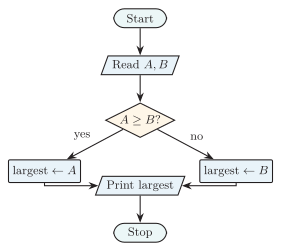
A complete larger-of-two flowchart using terminal, I/O, process and decision symbols with labeled branches.
the figure illustrates how directed arrows join terminal, input/output, process and decision symbols into executable order.
| Symbol | Meaning and correct use |
|---|---|
| Oval or rounded terminal | Start or Stop |
| Parallelogram | Input or output, such as Read or Print |
| Rectangle | Process, calculation or assignment |
| Diamond | Decision with labeled Yes/No or true/false exits |
| Arrow | Direction and sequence of control |
| Small circle | On-page connector that avoids crossed or excessively long lines |
Standard flowchart symbols.
START READ A, B IF A >= B THEN largest <- A ELSE largest <- B END IF PRINT largest STOP
The corresponding flowchart is terminal input decision. Each decision branch performs one assignment, the branches rejoin before output, and Stop has no outgoing arrow. Both representations must be tested with equal values as well as boundary inputs.
Eight-Bit Port Complement
Section titled “Eight-Bit Port Complement”The task is to read one unsigned eight-bit word from Port A, invert every bit and write the resulting eight-bit word to Port B. Because a machine’s bitwise NOT may operate on an integer wider than eight bits, the result must be masked:
START CONFIGURE Port A as INPUT CONFIGURE Port B as OUTPUT A <- READ Port A A <- A AND 0xFF B <- (NOT A) AND 0xFF WRITE B to Port B STOP
The input mask discards any bits outside the port word; the output mask removes the high-order ones introduced when NOT is evaluated at a wider machine width. For
the output field is
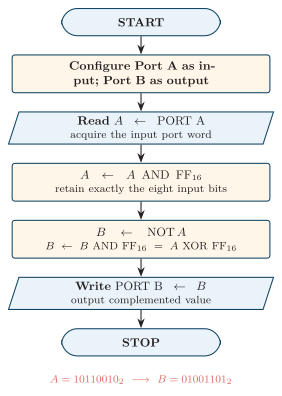
Flowchart for reading an eight-bit value from Port A, complementing it, and writing the result to Port B.
the figure uses terminal symbols for Start and Stop, parallelograms for port input/output, and a rectangle for the bitwise operation; the arrows give the exact execution order.
Data Types, Variables, Expressions and Arrays
Section titled “Data Types, Variables, Expressions and Arrays”A data type specifies a value’s representation, storage size or range, and permitted operations. A variable is a named storage location whose value may change during execution, whereas a constant is a named value that the program must not modify after definition.
| Type | Stored information | Example | Important limitation |
|---|---|---|---|
| Integer | Whole signed or unsigned number | count = 25 | Fixed-width overflow |
| Real or floating point | Approximate fractional value | voltage = 3.3 | Rounding error |
| Character | One encoded symbol | ’N’ | Encoding width varies |
| Boolean | True/false condition | isReady = true | Only logical states |
| String | Sequence of characters | "NTC" | Length and encoding must be managed |
Common data types and their limitations.
An expression combines operands–literals, variables or function results–with operators to produce a value. Arithmetic operators calculate, relational operators compare, logical operators combine conditions, and an assignment stores the resulting value. Parentheses should be used whenever the intended grouping might be unclear.
| Order | Operator class | Typical operators |
|---|---|---|
| 1 | Parenthesized expression | ( ) |
| 2 | Unary operation | sign and logical/bitwise NOT |
| 3 | Multiplication, division and remainder | *, /, % |
| 4 | Addition and subtraction | +, - |
| 5 | Relational and equality comparison | <, <=, >, >=, ==, != |
| 6 | Logical AND | AND or && |
| 7 | Logical OR | OR or |
A common operator-precedence pattern, highest first.
Exact symbols and precedence vary by language. Under the common arithmetic rules, multiplies first, while adds first.
One- and Two-Dimensional Arrays
Section titled “One- and Two-Dimensional Arrays”An array is an indexed collection of same-type elements, normally stored in contiguous locations. For a zero-based one-dimensional array with base address , element width bytes and index ,
For a row-major two-dimensional array , where each row has columns,
Arrays compactly represent tables, buffers and matrices. Their limitations are fixed size in many languages, costly insertion or deletion in the middle, homogeneous elements, and the need to keep every index within its valid range.
Functions of an Operating System
Section titled “Functions of an Operating System”An operating system (OS) is system software that acts as an interface between users or applications and computer hardware. It abstracts devices into convenient services, allocates resources fairly and safely, and provides the controlled environment in which programs execute.
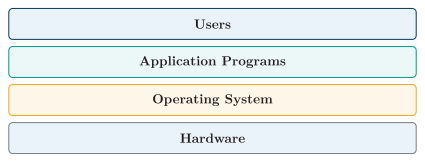
Position of the operating system between applications and hardware.
the figure places the OS between application software and hardware; users normally reach its services through applications and the user interface.
| Function | Main responsibilities |
|---|---|
| Process and CPU management | Create and terminate processes, schedule ready work, and support synchronization and inter-process communication |
| Memory management | Track and allocate RAM; provide paging, virtual memory, relocation and process protection |
| File and storage management | Organize files and directories; perform create, read, write and delete operations; manage permissions, free space and recovery |
| Device and I/O management | Control devices through drivers, interrupts, buffering, caching and spooling |
| Security and protection | Authenticate users, authorize access, isolate processes, audit actions and enforce least privilege |
| User and service interface | Supply a CLI or GUI and system calls; provide networking and error-handling services to applications |
Principal functions of an operating system.
Thus the OS is both a resource manager, deciding how hardware is shared, and an extended machine, hiding hardware-specific details behind convenient abstractions.
Process States and Scheduling
Section titled “Process States and Scheduling”A process is a program in execution together with its current CPU state, address space and allocated resources. It moves through defined states as it is admitted, scheduled, blocked and completed.
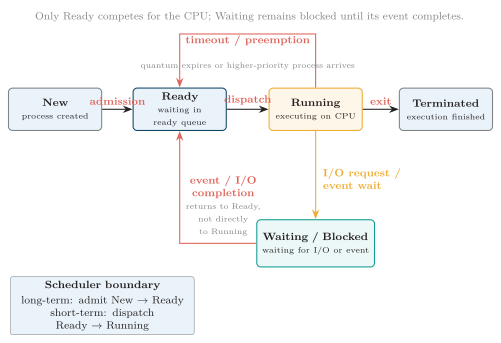
Five-state process model and scheduler transitions.
In the figure, the long-term scheduler admits New work to Ready and the short-term scheduler dispatches a Ready process to Running. A timeout or preemption returns it to Ready; an I/O request blocks it in Waiting; event completion returns it to Ready, not directly to Running; and successful completion moves it to Terminated.
| Policy | Strength | Limitation |
|---|---|---|
| First-Come, First-Served (FCFS) | Simple and fair by arrival order | A long job can cause the convoy effect |
| Shortest Job First (SJF) | Minimizes average waiting for a fixed ready set on one CPU when exact burst lengths are known | Burst prediction is difficult and long jobs may starve |
| Priority scheduling | Serves urgent work first | Low-priority processes may starve; aging is needed to counter this |
| Round Robin | Responsive time sharing | A very small quantum increases context-switch overhead |
Common CPU scheduling policies.
For a completed process, turnaround time is always measured from arrival to completion. If is its total CPU service and is its total blocked or I/O time, then
The common textbook formula is the special single-CPU-burst model with no blocked time. Scheduling comparisons must state whether arrival times, preemption, I/O and burst knowledge are assumed.
Process and Thread
Section titled “Process and Thread”A thread is the smallest unit of CPU execution inside a process. Several threads in one process share that process’s memory and resources.
| Feature | Process | Thread |
|---|---|---|
| Resource ownership | Own address space and resources | Shares its process’s resources |
| Creation overhead | Higher | Lower |
| Communication | Requires inter-process communication | Easier through shared memory |
| Failure isolation | Better isolation | One faulty thread can affect the whole process |
Process and thread compared.
Memory Management and File Systems
Section titled “Memory Management and File Systems”Operating systems use several memory-management schemes:
-
Contiguous allocation: gives each process one continuous memory block.
-
Paging: divides logical memory into fixed-size pages and physical memory into frames.
-
Segmentation: divides a program into logical segments.
-
Virtual memory: provides isolated virtual address spaces by mapping pages to physical frames; legal nonresident pages may use secondary backing storage, but virtual memory is not a physical RAM extension tier.
A file system organizes stored data into files and directories. Its key operations include create, open, read, write, close, delete and rename, together with access control, directory management, backup and recovery.
Types of Operating System
Section titled “Types of Operating System”| Type | Description | Example |
|---|---|---|
| Batch OS | Collects jobs and executes them in batches | Early mainframe systems |
| Time-sharing OS | Lets many users or processes share the CPU interactively | Unix or Linux |
| Real-time OS | Responds within strict time limits | Embedded control systems |
| Distributed OS | Manages multiple networked computers | Distributed computing systems |
| Mobile OS | Is designed for mobile devices | Android or iOS |
Major operating-system types.
Assembly Language: Merits, Limitations and Uses
Section titled “Assembly Language: Merits, Limitations and Uses”Assembly language is a processor-specific low-level language in which mnemonic operation names and symbolic operands represent machine instructions. An assembler translates those statements into object or machine code, resolves labels to addresses, and reports syntax or range errors. A typical source statement has the form
opcodeoperand(s); comment
For example, MOV R1, #5 loads an immediate constant, ADD R1, R2 names an opcode and register operands, and JNZ LOOP branches to a symbolic label when the zero flag is clear.
| Advantages | Disadvantages |
|---|---|
| Direct control of registers, flags, memory and I/O ports | Instruction set, registers and syntax are machine-dependent |
| Can be compact and permits deliberate instruction selection in measured critical routines | More source statements and much longer development time |
| Direct expression of startup, interrupt and device-control operations | Difficult debugging, maintenance and team readability |
| Can exploit instructions unavailable in a high-level language | Manual calling conventions and resource management invite errors |
Merits and limitations of assembly language.
A short interrupt-service routine, for example, may save registers, read a device status port, acknowledge the interrupt and restore context with an explicit instruction sequence. Predictable worst-case latency still requires platform-specific analysis of caches, pipelines, memory waits, priorities and nested interrupts. Assembly is appropriate for boot code, context switching, tiny embedded targets and measured performance-critical sections. Compilers are normally preferred for complete applications because they support portability and optimization across large code bases.
Program Development Steps
Section titled “Program Development Steps”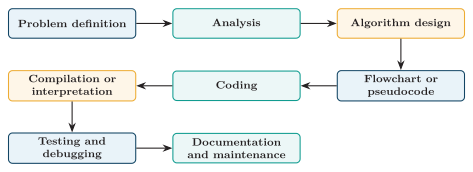
Program development steps from problem definition through maintenance.
the figure shows that implementation begins only after the problem and logic have been defined, and that useful software ends in documentation and continuing maintenance rather than at the first successful run.
| Step | Purpose |
|---|---|
| Problem definition | Understand exactly what must be solved |
| Analysis | Identify inputs, outputs, constraints and required processing |
| Algorithm design | Prepare the ordered step-by-step solution |
| Flowchart or pseudocode | Represent and inspect logic before coding |
| Coding | Write the program in a selected programming language |
| Compilation or interpretation | Translate or execute the source and expose translation errors |
| Testing | Check correctness with representative, boundary and invalid data |
| Debugging | Locate, explain and remove errors |
| Documentation and maintenance | Explain design, code and use, then correct or adapt the program during its life |
Program development lifecycle.
Algorithm Complexity
Section titled “Algorithm Complexity”Algorithm efficiency is commonly expressed by time complexity, the growth of execution work as input size increases, and space complexity, the corresponding growth of memory use. Big- notation groups algorithms by dominant growth rather than machine-specific running time.
| Complexity | Meaning | Example |
|---|---|---|
| Constant time | Access an array element by index | |
| Logarithmic time | Binary search | |
| Linear time | Sequential search | |
| Linearithmic time | Efficient sorting | |
| Quadratic time | Simple nested-loop sorting |
Common time-complexity classes.
Sequence, Selection and Iteration
Section titled “Sequence, Selection and Iteration”Structured flowcharts and programs are built from three control structures.
| Structure | Description | Typical representation |
|---|---|---|
| Sequence | Steps execute once, one after another | Consecutive process blocks |
| Selection | A decision selects one path | if--else with labeled branches |
| Iteration | A body executes repeatedly while a condition controls repetition | while or for loop with a return arrow |
Basic program control structures.
Programming Errors and Debugging
Section titled “Programming Errors and Debugging”| Error type | Meaning | Example |
|---|---|---|
| Syntax error | Violates the language grammar | Missing semicolon or bracket |
| Logical error | Program runs but produces a wrong result | Wrong formula |
| Runtime error | Occurs while the program executes | Divide by zero or invalid memory access |
| Semantic error | A grammatically formed statement has an invalid meaning | Type mismatch |
Principal programming-error types.
Debugging is the process of finding and correcting errors. Common techniques are to trace execution step by step, print or inspect intermediate values, use breakpoints and a debugger, and test boundary and invalid inputs. Testing reveals a failure; debugging locates its cause and verifies the repair.
Compiler, Interpreter and Assembler
Section titled “Compiler, Interpreter and Assembler”| Feature | Compiler | Interpreter | Assembler |
|---|---|---|---|
| Input | High-level program | High-level program | Assembly program |
| Output or action | Translates source, commonly to object/native code or intermediate bytecode | Executes through an interpreter or runtime, possibly using parsed bytecode or JIT-compiled code | Maps mnemonics, operands and labels to object or machine representation |
| When translation occurs | Primarily before normal execution; linking, loading or JIT stages may follow | Progressively or in runtime stages, not necessarily one source line at a time | Before the assembled program executes |
| Performance | Depends on generated code, runtime and workload; optimized AOT or JIT code can be fast | Runtime dispatch may add overhead, but implementation and workload determine speed | Depends on the emitted instruction sequence and target machine |
| Error reporting | Translation errors are usually found before execution; runtime failures remain possible | Parsing may diagnose errors up front while dynamic failures appear during execution | Syntax, symbol and encoding errors are reported during assembly |
Language translators compared.
A compiler translates a high-level source program into another representation before a later execution stage. An interpreter executes program meaning under a runtime, which may itself compile bytecode or hot regions. A just-in-time (JIT) compiler combines runtime observation with compilation. An assembler maps processor-specific mnemonic statements and symbols to machine representation; these categories describe translation strategy, not a universal speed ranking.
Quick Review
Section titled “Quick Review”-
Algorithm: must be finite, definite and effective, accept zero or more inputs, and produce at least one output.
-
Flowchart symbols: oval for Start/Stop, rectangle for process, diamond for decision, parallelogram for I/O, arrow for flow and small circle for an on-page connector.
-
Data: a variable can change; a constant cannot; an expression follows the language’s precedence rules.
-
Array addresses: one-dimensional ; row-major two-dimensional .
-
Assembly: uses processor-specific mnemonics translated by an assembler and suits boot code, ISRs and small critical routines.
-
Operating system: manages CPU, memory, files, devices, security and the user/service interface.
-
Process states: New is admitted to Ready, Ready is dispatched to Running, Running may wait or be preempted, and completion terminates it.
-
Scheduling: FCFS, SJF, Priority and Round Robin; turnaround is completion minus arrival.
-
Program quality: analyze before coding, use sequence, selection and iteration, then test and debug syntax, semantic, runtime and logical errors.
-
Translators: compiler and interpreter accept high-level source; assembler accepts assembly source.