Internet and Networking
A computer network is a set of interconnected devices that exchange data and share resources through agreed communication protocols. The Internet is the global packet-switched network of interconnected networks that uses the TCP/IP protocol suite. The Internet is infrastructure; the World Wide Web, email, file transfer and DNS are services that operate over it.
Network communication requires a source and destination, a transmission medium, addressing, rules for formatting and exchanging data, and intermediate devices that forward traffic. Scope, topology, protocol layer and service role answer different questions and must not be used interchangeably.
Network Scope: PAN, LAN, MAN and WAN
Section titled “Network Scope: PAN, LAN, MAN and WAN”Networks are classified partly by geographical reach and partly by administrative ownership. The boundaries are descriptive rather than exact distance limits.
| Type | Typical coverage | Ownership and technology | Example and operating implication |
|---|---|---|---|
| PAN | A person’s immediate area | One user; Bluetooth, USB or short-range wireless | Phone linked to a headset; very short reach and low infrastructure overhead |
| LAN | Room, building or campus | Usually one home or organization; Ethernet and Wi-Fi | PCs and printers in an office; high local capacity and direct local administration |
| MAN | Town or metropolitan region | Municipality, operator or consortium; Metro Ethernet and fiber rings | Fiber linking exchanges across Kathmandu; routing and resilient metropolitan paths are needed |
| WAN | Regional, national or global | Multiple organizations, telecom operators and ISPs; MPLS/IP, leased lines, microwave, submarine fiber and satellite | Operator backbone connecting provinces or the Internet; more hops, carrier agreements and greater delay/error exposure |
PAN, LAN, MAN and WAN compared.
In the usual comparison, LAN delay and error exposure are lowest, MAN is intermediate, and WAN is highest because distance and the number of intermediate systems increase. This is a tendency, not a guarantee: a congested wireless LAN can perform worse than a well-engineered WAN.
LANs commonly permit direct local administration and high capacity. MAN and WAN designs additionally need routing, service-level agreements, path redundancy and strong protection when traffic crosses shared or untrusted facilities.
Physical and Logical Topologies
Section titled “Physical and Logical Topologies”A network topology is either the physical arrangement of nodes, ports and links or the logical path followed by frames or signals. These views can differ: switched Ethernet is normally a physical star whose links are logically independent point-to-point connections.
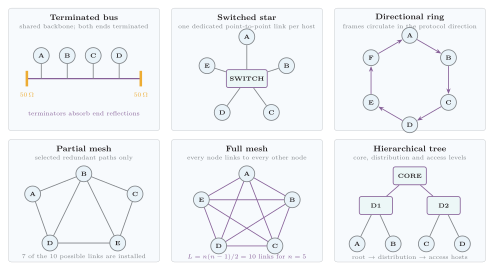
Physical link arrangements and traffic direction for terminated bus, switched star, directional ring, partial mesh, full mesh and hierarchical tree topologies.
| Topology | Arrangement | Advantages | Failure domain and limitations |
|---|---|---|---|
| Bus | Every station taps one backbone terminated at both ends | Low cable cost and simple small installation | A backbone break or bad terminator can stop all nodes; the shared medium has collisions and poor fault isolation |
| Star | Every station has a separate link to a central hub or switch | Easy addition, management and spoke-fault isolation | One spoke failure affects one node, but central-device or power failure affects the whole star |
| Ring | Each node has two neighbors in a closed loop; traffic follows the ring protocol | Orderly, predictable access without a central hub | One link or node can break a single ring; dual counter-rotating rings improve recovery at extra cost |
| Mesh | Nodes have several links; a full mesh joins every pair | Multiple paths, high availability and load sharing | Port/cable cost and routing complexity; full-mesh growth is quadratic |
| Tree | Access nodes feed distribution nodes under a core/root | Scalable hierarchy and policy aggregation | An upper-level failure can disconnect an entire branch unless the hierarchy is redundantly connected |
Characteristics of common network topologies.
For nodes in a full mesh, each node could connect to others, but counting both ends would count every link twice. Therefore
IP Addressing and Internet Protocols
Section titled “IP Addressing and Internet Protocols”An IP address is a logical network-layer identifier assigned to an interface. Routers compare its network prefix with routing-table entries to choose a next hop. It is not the same as a data-link MAC address, a DNS name, or the physical location of a device.
An IPv4 address contains 32 bits and is normally written as four decimal octets, for example 192.168.10.25. Early IPv4 allocation used the following classful interpretation.
| Class | First octet | Default prefix | Historical purpose |
|---|---|---|---|
| A | –126 | /8 | Very large unicast networks |
| B | –191 | /16 | Medium unicast networks |
| C | –223 | /24 | Small unicast networks |
| D | –239 | Not host addressing | Multicast |
| E | –255 | Not ordinary host addressing | Reserved or experimental |
Historical classful IPv4 ranges.
The entire 127.0.0.0/8 block is reserved for loopback: traffic sent there remains within the host. Zero-valued addresses also have special meanings; for example, 0.0.0.0 can denote an unspecified local address and 0.0.0.0/0 is the default route, so neither should be treated as an ordinary assigned host address without context.
| Prefix | Meaning |
|---|---|
10.0.0.0/8 | Large private range |
172.16.0.0/12 | Private range from 172.16.0.0 through 172.31.255.255 |
192.168.0.0/16 | Common home and organizational private range |
Private IPv4 address space.
Private addresses can be routed internally but are not globally routed on the public Internet. An edge router often translates them with NAT, although NAT is not encryption and does not replace a firewall.
Subnet Mask and Prefix Length
Section titled “Subnet Mask and Prefix Length”A subnet mask separates the network and host portions of an IPv4 address. It has leading one bits followed by zero bits for prefix /n; bitwise AND of the address and mask gives the subnet address.
The subtraction reserves the all-zero host part as the network address and the all-one host part as the directed broadcast address. It is the traditional exam rule, not a universal law: /31 point-to-point links can use both addresses and /32 identifies one host route.
IPv6 and Address Comparison
Section titled “IPv6 and Address Comparison”IPv6 expands the address to 128 bits and writes eight hexadecimal groups separated by colons, for example 2001:0db8:0000:0000:0000:ff00:0042:8329. Leading zeros in a group may be omitted and one consecutive run of zero groups may be compressed as ::.
| Feature | IPv4 | IPv6 |
|---|---|---|
| Address length | bits | bits |
| Notation | Dotted decimal | Hexadecimal colon notation |
| Address space | ||
| Base header | Variable length, normally 20–60 bytes | Simplified fixed 40-byte base header; optional information uses extension headers |
| Broadcast | Supported | No broadcast; multicast and anycast serve the relevant delivery cases |
| NAT | Common because public addresses are scarce | Usually less necessary for address conservation, though translation may still be deployed |
IPv4 and IPv6 compared.
Layered Protocol Architecture
Section titled “Layered Protocol Architecture”Layering divides communication into manageable services. At the sender, application data is carried by TCP, UDP or a transport built over UDP such as QUIC; IP supplies logical addressing and routing; Ethernet, Wi-Fi or another link technology creates a local frame; and the physical layer sends bits as electrical, optical or radio signals.
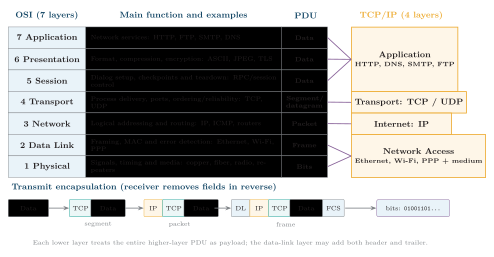
OSI and TCP/IP layer mapping with functions, protocol examples, PDUs and the encapsulation sequence from application data to transmitted bits.
The seven-layer OSI model is a conceptual ISO reference framework, whereas the four-layer TCP/IP model describes the practical Internet architecture. Their functional mapping is:
-
OSI Application Presentation Session TCP/IP Application;
-
OSI Transport TCP/IP Transport;
-
OSI Network TCP/IP Internet; and
-
OSI Data Link Physical TCP/IP Network Access.
The protocol data units (PDUs) are data at the upper layers, a TCP segment or UDP datagram at transport, an IP packet at network, a frame at data link and bits at physical. During encapsulation, each lower layer adds control information around the complete higher-layer PDU; the data-link layer commonly adds both a header and an error-detecting trailer/FCS. The receiver decapsulates in reverse and delivers the payload upward.
Domain Name System
Section titled “Domain Name System”The Domain Name System (DNS) is a distributed hierarchical database that maps domain names to typed resource records, including IPv4/IPv6 addresses, mail exchangers and authoritative name servers. DNS resolution does not itself carry the later web or email content.
The host’s stub resolver first checks an unexpired browser or OS cache and then sends one recursive query to its configured recursive resolver. If that resolver has no valid cached answer, it performs iterative queries: a root server refers it to the relevant top-level domain (TLD) server, the TLD server refers it to the domain’s authoritative server, and the authoritative server returns the requested record.
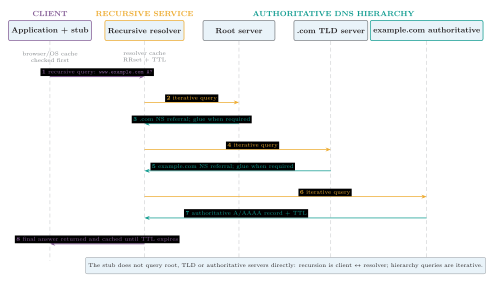
DNS resolution as one recursive client query followed, on a cache miss, by iterative root, TLD and authoritative queries and TTL-controlled caching.
The resolver returns the answer to the stub and caches the result for its time-to-live (TTL). Referrals, address records and negative answers may all be cached. A recursive resolver performs work on the client’s behalf; an iterative server normally returns the best answer or referral it has. The client stub does not normally walk the root/TLD hierarchy itself.
Common DNS Records
Section titled “Common DNS Records”| Record | Purpose |
|---|---|
| A | Maps a name to an IPv4 address |
| AAAA | Maps a name to an IPv6 address |
| CNAME | Makes one domain name an alias of another canonical name |
| MX | Identifies the mail exchanger for a domain |
| NS | Identifies an authoritative name server for a DNS zone |
| TXT | Carries text information, including data used for SPF and DKIM verification |
Common DNS resource records.
URL Structure
Section titled “URL Structure”A Uniform Resource Locator (URL) identifies how and where a client can access a resource. Its complete general anatomy is
scheme://host:port/path?query#fragment
https://www.example.com:443/docs/page?unit=ict#dns
| Component | Example | Function |
|---|---|---|
| Scheme | https | Selects the access protocol and its default port |
| Host | www.example.com | Names the destination host; DNS normally resolves it to one or more IP addresses |
| Port | 443 | Optionally selects the destination server process; the scheme supplies a default when omitted |
| Path | /docs/page | Identifies a resource within the server’s namespace |
| Query | unit=ict | Supplies parameters to the server-side resource |
| Fragment | dns | Identifies a client-side section of the returned representation and is normally not sent in the HTTP request |
Meaning of each URL component.
HTTP and HTTPS
Section titled “HTTP and HTTPS”HTTP is a stateless application-layer request/response protocol. A client sends a method, target, headers and possibly a body; a server returns a status code, headers and possibly a representation. Stateless means each HTTP request is independently interpretable, not that a web application cannot maintain state through cookies, tokens or server-side sessions.
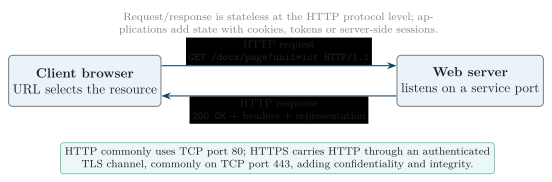
HTTP request and response between a browser and a web server, with the transport protection added by HTTPS/TLS.
HTTPS carries HTTP through TLS. Certificate-based server authentication helps the client verify the named peer, encryption provides confidentiality in transit, and integrity protection detects modification. HTTPS does not prove that the site’s content is honest, remove endpoint malware or replace application authorization.
HTTP Methods and Status Codes
Section titled “HTTP Methods and Status Codes”| Method | Intended use |
|---|---|
| GET | Retrieve a resource representation |
| POST | Submit data for processing or create a subordinate resource |
| PUT | Replace, or create at, the addressed resource |
| PATCH | Partially update a resource |
| DELETE | Request deletion of the addressed resource |
Common HTTP methods.
| Code | Meaning | Interpretation |
|---|---|---|
| 200 | OK | Request succeeded |
| 301 / 302 | Redirect | Resource is permanently/temporarily available at another location |
| 400 | Bad Request | Server cannot process malformed or invalid request syntax |
| 401 | Unauthorized | Authentication is required or failed; despite the name, this is primarily an authentication response |
| 403 | Forbidden | Server understood the request but refuses authorization |
| 404 | Not Found | Requested resource was not found |
| 500 | Internal Server Error | Server encountered an unexpected failure |
Frequently tested HTTP status codes.
FTP, FTPS and SFTP
Section titled “FTP, FTPS and SFTP”| Protocol | Foundation | Connections and common port | Security meaning |
|---|---|---|---|
| FTP | File Transfer Protocol | TCP control connection on port 21 plus a separate active or passive data connection | Basic FTP does not encrypt credentials or payload |
| FTPS | FTP with TLS | FTP control/data model with explicit or implicit TLS | Adds TLS protection while remaining FTP |
| SFTP | SSH File Transfer Protocol | One SSH connection, commonly TCP port 22 | A different protocol carried by SSH; it is not an FTP “secure mode” |
File-transfer protocol distinction.
Hub, Switch and Router
Section titled “Hub, Switch and Router”A hub is a physical-layer multiport repeater. A switch is a data-link bridge that learns source MAC addresses and forwards frames toward a learned destination port. A router is a network-layer device that matches destination IP addresses against a routing table and forwards packets between IP networks.
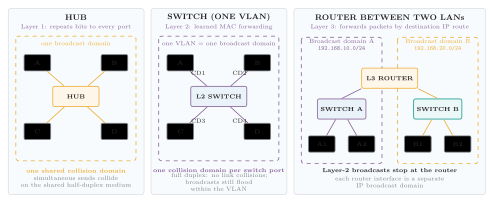
Hub, one-VLAN switch and router behavior, showing collision domains and the Layer-2 broadcast boundaries separated by routing.
| Feature | Hub | Layer-2 switch | Router |
|---|---|---|---|
| OSI layer / unit | Layer 1 / bits | Layer 2 / frames | Layer 3 / packets |
| Forwarding basis | None; repeats incoming bits | Learned MAC address table | Longest matching IP prefix and next hop |
| Collision domains | One shared domain | One per switched port | One per interface or point-to-point link |
| Broadcast domains | One | One per VLAN | Each routed interface is a separate IP broadcast domain |
| Typical use | Obsolete small or shared test segment | Connect hosts inside a LAN/VLAN | Connect LANs/VLANs to other networks or a WAN |
Hub, Layer-2 switch and router compared.
A hub repeats unicast and broadcast traffic to every port and permits collisions on a shared half-duplex segment. A switch gives each port a separate full-duplex collision domain, but floods broadcasts and unknown unicasts within the VLAN. A router does not normally forward Layer-2 broadcasts, so its interfaces bound separate IP broadcast domains.
Client-Server Model and Server Roles
Section titled “Client-Server Model and Server Roles”A server is a software process that listens for requests and provides controlled resources to client programs. A client initiates a request. One physical or virtual computer may run several server processes, distinguished by transport addresses and ports.
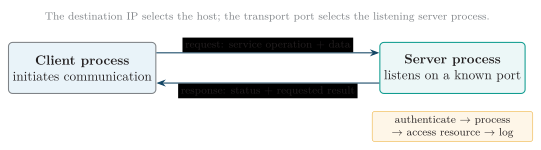
Client-server operation: the client initiates a request, the listening server processes it and returns a controlled response.
Web, Email and Print Servers
Section titled “Web, Email and Print Servers”The destination IP address selects the server host and the TCP or UDP port selects the listening process. The server authenticates or validates the request as required, accesses a resource, returns a response and should log security-relevant activity.
| Server | Main function | Protocols and common ports | Example |
|---|---|---|---|
| Web | Stores or generates pages, files and API responses | HTTP/TCP 80; HTTPS with TLS commonly TCP 443 | Browser requests a self-care page from Nginx, Apache or an application server |
| Accepts, relays, filters, stores and retrieves messages | SMTP relay TCP 25; submission 587; IMAP 143/993; POP3 110/995 | Sender server looks up the recipient MX record and transfers mail by SMTP | |
| Shares printers, accepts jobs, queues/spools them and reports status | IPP commonly TCP 631, plus vendor and legacy print protocols | Several clients submit jobs that are serialized for one office printer |
Web, email and print server roles and common ports.
Port numbers identify conventional service endpoints, but configuration can change them. A listed port therefore aids connection and filtering; it does not by itself authenticate the service.
Transmission Media
Section titled “Transmission Media”Transmission media are guided when a physical conductor or waveguide confines the signal and unguided when electromagnetic waves propagate through free space.
Guided Media
Section titled “Guided Media”| Medium | Main characteristics | Typical use |
|---|---|---|
| Twisted pair | Cheap and easy to install; copper attenuation and interference limit reach and rate | Ethernet LAN and telephone line |
| Coaxial cable | Better shielding than twisted pair; robust shared radio-frequency path | Cable television and older Ethernet |
| Optical fiber | Very high bandwidth, low loss, electrical isolation and immunity to EMI | Backbone, FTTH and long-distance links |
Guided transmission media.
Unguided Media
Section titled “Unguided Media”| Medium | Main characteristics | Typical use |
|---|---|---|
| Radio wave | Often omnidirectional and able to penetrate buildings; shared spectrum suffers interference | Wi-Fi and mobile communication |
| Microwave | Directional and normally line-of-sight; high antenna gain and frequency reuse | Terrestrial point-to-point link and satellite uplink |
| Infrared | Short range and usually line-of-sight; does not readily penetrate walls | Remote controls and short-range device links |
Unguided transmission media.
Media selection balances required rate and reach against attenuation, noise, EMI, terrain, spectrum/licensing, security exposure, installation effort, availability and total cost.
Transport Protocols: TCP and UDP
Section titled “Transport Protocols: TCP and UDP”TCP and UDP both use port numbers for process-to-process delivery, but provide different service contracts over IP.
| Feature | TCP | UDP |
|---|---|---|
| Connection | Connection-oriented byte stream | Connectionless datagrams |
| Reliability | Sequence numbers, acknowledgements and retransmission | Best effort; an application must add recovery if needed |
| Ordering | Delivers bytes in order and suppresses duplicates | No delivery, ordering or duplicate-suppression guarantee |
| Flow/congestion control | Built in | Not supplied by UDP itself |
| Overhead and latency | More setup/state/header overhead | Small header and no connection setup; low protocol overhead |
| Typical use | Web over HTTP/1.1 or HTTP/2, email, FTP and SSH | Many DNS queries, streaming, VoIP, gaming and QUIC/HTTP/3 |
TCP and UDP compared.
“UDP is faster” is only a shorthand for lower built-in overhead. Application design, loss recovery, congestion and network conditions determine observed performance. DNS normally uses UDP for compact queries but can use TCP for large responses, retries and zone transfer; modern HTTP/3 uses QUIC over UDP while implementing reliability and security above UDP.
Electronic Mail Protocols
Section titled “Electronic Mail Protocols”Email separates message transfer from mailbox access. SMTP pushes a message from a client to a submission server and between mail servers. The recipient then uses IMAP to synchronize a server-resident mailbox or POP3 primarily to download messages.
| Protocol | Direction and function | Important distinction |
|---|---|---|
| SMTP | Sends/submits and relays mail toward the recipient server | Transfer protocol; MX DNS records identify destination mail exchangers |
| POP3 | Downloads mail from server to client | Simple retrieval, often oriented toward local storage |
| IMAP | Synchronizes mailbox state between server and one or more clients | Folders, flags and messages normally remain coordinated on the server |
Core email protocols.
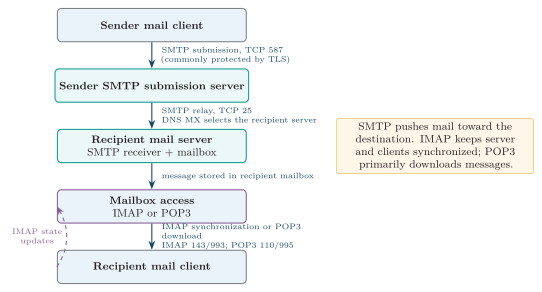
Email delivery from the sender client through SMTP submission and server-to-server relay to recipient mailbox access by IMAP or POP3.
TLS-protected variants or STARTTLS protect links in transit, but mail can cross several administrative systems; endpoint access control, anti-spam checks and appropriate end-to-end content protection remain separate concerns.
Gateway, Intranet and Extranet
Section titled “Gateway, Intranet and Extranet”A gateway connects dissimilar systems or performs protocol/format translation. In ordinary IP host configuration, the default gateway is more specifically the router to which a host sends packets for destinations outside its local subnet.
| Term | Meaning |
|---|---|
| Internet | Public global interconnection of IP networks |
| Intranet | Private organizational network that uses Internet technologies such as IP, DNS, web applications and browsers |
| Extranet | Controlled extension of private-network services to selected external partners, suppliers or customers |
Internet, intranet and extranet.
An extranet is not simply a public website: identities, authorization and network/application controls restrict which external parties reach which private resources.
Basic Network Security Controls
Section titled “Basic Network Security Controls”Security is layered because no single control supplies identity, confidentiality, authorization, availability and detection simultaneously.
| Control | Purpose and qualification |
|---|---|
| Firewall | Permits or denies traffic according to address, port, protocol, state or application policy; rules must be least-privilege and reviewed |
| Authentication | Verifies a user, service or device identity; strong methods include MFA and certificate/key-based credentials |
| Encryption | Protects confidentiality and usually integrity in transit; it does not decide whether an authenticated party is authorized |
| VPN | Creates an authenticated encrypted tunnel across an untrusted network; the protected endpoints and access policy still require security |
| Access control | Limits resources and operations to authorized identities, roles, devices or network segments |
| Segmentation | Uses VLANs, subnets, routing/firewall policy or separate zones to limit reachability and fault/attack propagation |
| Logging and monitoring | Records activity and detects suspicious behavior; logs need time synchronization, protection, review and response procedures |
| Patching and secure configuration | Removes known weaknesses, disables unused services and changes insecure defaults |
| Backup and recovery | Restores essential configurations and data after failure or attack; backups must be protected and restoration tested |
Basic network controls and their purposes.
Quick Review
Section titled “Quick Review”-
Scope: PAN is personal, LAN covers a site, MAN spans a city and WAN spans regions to the globe.
-
Topology: modern LANs commonly use switched star; WANs often use partial mesh, while full mesh needs links.
-
Addressing: IPv4 is 32-bit and IPv6 is 128-bit; CIDR prefixes, not obsolete address classes, define modern networks.
-
Layering: OSI has seven layers and TCP/IP is commonly shown with four; each lower layer encapsulates the higher-layer PDU with its own control information.
-
Transport: TCP is reliable, ordered and connection-oriented; UDP is connectionless with low built-in overhead.
-
DNS: the stub makes a recursive request to a resolver; on a cache miss the resolver makes iterative root, TLD and authoritative queries.
-
URL: remember the exact order
scheme://host:port/path?query#fragment. -
Web: HTTP is stateless request/response; HTTPS adds TLS peer authentication, confidentiality and integrity in transit.
-
File transfer: FTP uses separate control and data connections, FTPS adds TLS to FTP, and SFTP is a distinct SSH protocol.
-
Devices: a hub repeats bits, a switch forwards frames by MAC address and a router forwards packets by IP prefix.
-
Domains: a hub shares one collision and broadcast domain; a switch separates collision domains per port and VLANs separate broadcast domains; router interfaces bound IP broadcast domains.
-
Media and services: guided media use copper/fiber, unguided media use free-space radio; server ports identify web, mail and print processes.
-
Email: SMTP transfers mail, POP3 downloads it and IMAP synchronizes a server-resident mailbox.
-
Private access: an intranet is internal; an extranet grants controlled access to selected external parties; the default gateway routes off-subnet traffic.