Cyber Security
Cyber security is the coordinated protection of computers, networks, software, services, data and users against unauthorized access, alteration, disclosure, disruption, destruction or theft. It combines people, process and technology; installing one security product is therefore not a complete security programme.
Security Objectives: the CIA Triad
Section titled “Security Objectives: the CIA Triad”The three fundamental objectives are confidentiality, integrity and availability (CIA). They must be balanced: a system that keeps data secret but cannot deliver an essential service is not secure for its intended purpose.
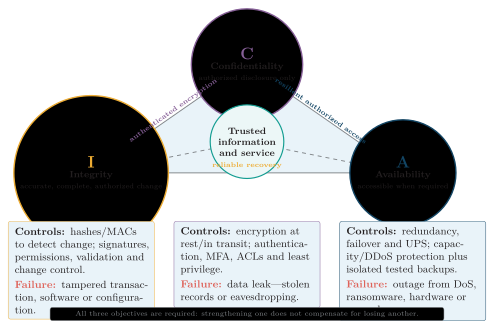
CIA triad with representative controls and concrete failure examples for confidentiality, integrity and availability.
| Objective | Meaning | Failure example | Representative controls |
|---|---|---|---|
| Confidentiality | Information is disclosed only to authorized subjects | An intruder reads customer records | Encryption, authentication, access control and data classification |
| Integrity | Information and systems remain accurate, complete and changed only in authorized ways | An account balance or software file is altered | Hashes or MACs, digital signatures, permissions, validation and audit logs |
| Availability | Authorized users receive required data and service when needed | DDoS, hardware failure or ransomware makes a portal unavailable | Redundancy, capacity protection, patching, backups and disaster recovery |
CIA objectives, representative failures and controls.
Related Security Goals
Section titled “Related Security Goals”Authentication
verifies a claimed user, service or device identity.
Authorization
decides which resources and operations an authenticated identity is permitted to use.
Accountability
makes actions attributable through unique identities, protected logs, time synchronization and review.
Non-repudiation
provides strong evidence that helps prevent a party from plausibly denying an action; it depends on trustworthy keys, identities, procedures and records, not on a cryptographic value alone.
Virus, Worm and Trojan Horse
Section titled “Virus, Worm and Trojan Horse”Malware is software or code intentionally designed to disrupt, damage, spy, steal or obtain unauthorized control. Malware is the broad class; virus, worm and Trojan horse name different propagation or delivery behaviours and must not be treated as synonyms.
Virus
inserts or attaches its code to a host file, executable, document macro or boot area. It normally spreads when the infected host is opened or executed; self-replication is tied to that carrier.
Worm
is a stand-alone, self-replicating program that spreads automatically between systems, commonly through a network vulnerability or weak credential. It does not require a host file.
Trojan horse
presents itself as useful or legitimate software so that a user installs or runs it. It may steal data, establish covert access or deliver other malware, but a Trojan is not defined by self-replication.

Conceptual virus lifecycle from dormancy through propagation and triggering to payload execution or damage.
| Feature | Virus | Worm | Trojan horse |
|---|---|---|---|
| Host file required | Usually yes | No | No; the disguised application is the carrier |
| Initial user action | Often opening or running infected content | May need none after the first foothold | Usually a tricked download, install or launch |
| Propagation | Infected files, removable media, boot areas or macros | Automatic network scanning/exploitation or credential abuse | Social engineering, fake utilities or untrusted/pirated software |
| Typical impact | File infection/corruption and payload execution | Rapid spread, resource exhaustion and delivery of further payloads | Credential theft, remote access or covert persistence |
| Prevention focus | Anti-malware, macro/media control and trusted files | Rapid patching, firewalling and segmentation | Application allow-listing, signed software and user verification |
Precise comparison of virus, worm and Trojan horse.
Digital Signature Creation and Verification
Section titled “Digital Signature Creation and Verification”A digital signature is a public-key cryptographic value bound to a particular message and signer. It supports message integrity, origin authentication and, under trustworthy identity and key-management procedures, evidence for non-repudiation.
Let be the message, a secure hash function, signer A’s private key, the corresponding public key and the signature. The conceptual creation equations are
In a real signature scheme the hashing and encoding may be integrated into the signature algorithm, but the exam model correctly emphasizes that the digest binds the signature to the exact message.
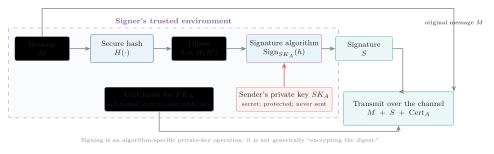
Digital-signature creation: hash the message, sign the digest with the protected sender private key, and transmit the message, signature and certificate; the private key never leaves the trusted environment.
Creation Procedure
Section titled “Creation Procedure”-
A hashes the exact message with an approved collision-resistant function to obtain .
-
A’s signature algorithm uses the protected private key to produce . The private key is never transmitted.
-
A sends , and normally a certificate that binds A’s identity to ; the certificate is public, while remains secret.
The receiver independently hashes the received message and invokes the scheme’s verification algorithm:
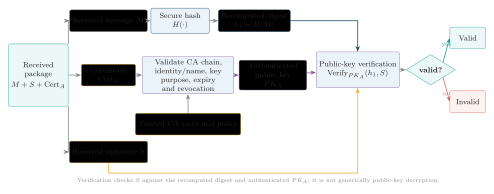
Digital-signature verification: validate the certificate to obtain an authenticated public key, hash the received message independently, and run the signature algorithm’s verification operation to obtain valid or invalid.
Verification Procedure
Section titled “Verification Procedure”-
Validate the certificate chain and confirm identity/name, permitted key usage, validity period and revocation status to obtain an authenticated .
-
Recompute from the exact received message.
-
Supply , and to the matching verification algorithm. Accept only a valid result under the required policy; otherwise reject and log or investigate as appropriate.
Security Properties and Limitation
Section titled “Security Properties and Limitation”| Property | Reason and qualification |
|---|---|
| Integrity | A change to changes with overwhelming probability, so the old signature should no longer verify |
| Origin authentication | A valid signature is evidence that the corresponding private key produced it, provided the public key is correctly bound to A |
| Non-repudiation evidence | A third party may assess the signature, certificate, timestamp, audit trail and key-custody evidence; a signature alone cannot prove who physically controlled a compromised or shared key |
What a valid digital signature establishes.
Public-Key Infrastructure Components
Section titled “Public-Key Infrastructure Components”Public-key infrastructure (PKI) supplies the trust framework that binds public keys to identities and manages their lifecycle. A certificate authority (CA) signs certificates; a registration process validates identity; repositories distribute certificates and status information; relying parties validate them under policy.
| Component | Function | Required control |
|---|---|---|
| Private key | Creates A’s signatures | Generate securely; restrict use; keep secret in protected hardware/software; never transmit |
| Public key and certificate | Enable verification and bind to A’s identity | Validate CA chain, identity/name, purpose, expiry and revocation; do not trust an unauthenticated key merely because it is called public |
| CA and registration function | Validate identity and issue/sign certificates under policy | Protect CA signing keys; audit issuance; publish status and revocation information |
| Hash/signature algorithm | Bind exact content to the signature | Use approved collision-resistant hashes, signature schemes, key sizes and parameters |
| Timestamp and audit record | Show when signing occurred and preserve evidence | Use a trusted timestamp, protected logs, synchronized time and long-term validation data where evidence must outlive a certificate |
Digital-signature and PKI components.
Encryption, MAC and Digital Signature Compared
Section titled “Encryption, MAC and Digital Signature Compared”| Mechanism | Main service | Secret arrangement | Can a recipient prove origin to a third party? |
|---|---|---|---|
| Encryption | Confidentiality; authenticated encryption also protects ciphertext integrity | Symmetric shared key or an authenticated recipient-key arrangement | Not by encryption alone |
| MAC | Integrity and source authentication among key holders | Sender and receiver share one MAC key | Usually no; either key holder could have made the MAC |
| Digital signature | Integrity, origin authentication and potential non-repudiation evidence | Only signer holds signing secret; verifier uses authenticated public key | Potentially yes, with valid PKI, policy and key custody |
Different cryptographic mechanisms provide different services.
Hacking versus Cracking; Spam versus Phishing
Section titled “Hacking versus Cracking; Spam versus Phishing”Hacking broadly means exploring, modifying or testing computer systems and weaknesses. The word alone does not establish legality: the decisive questions are authorization, scope and intent. Cracking means unauthorized, malicious defeat of security or software protection to steal, damage, disrupt or bypass controls.
| Basis | Ethical or authorized hacking | Cracking |
|---|---|---|
| Permission | Written authorization with named assets, time window and rules of engagement | Permission absent or exceeded |
| Purpose | Find, explain and help remediate weaknesses | Theft, damage, misuse, covert access or protection bypass |
| Method/output | Controlled tests, protected evidence and responsible report | Covert exploitation, evasion and unauthorized persistence |
| Legal/ethical status | Lawful only while every action remains within valid permission and applicable law | Unlawful and unethical |
Authorized ethical hacking and cracking compared.
Ethical Security-Testing Workflow
Section titled “Ethical Security-Testing Workflow”The objective is to demonstrate and reduce risk with the minimum necessary impact, not to obtain enduring access. Evidence must be proportionate, confidential data protected, and unexpected effects reported immediately under the rules of engagement.
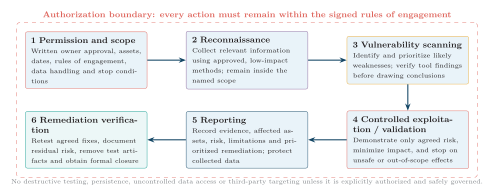
Ethical security-testing workflow from written permission and scope through reconnaissance, scanning, controlled validation, reporting and remediation verification.
The workflow is permission and scope reconnaissance vulnerability scanning controlled validation reporting remediation verification. A useful report distinguishes verified findings from automated-tool indications, states business impact and evidence, and gives prioritized corrective action.
Spam and Phishing
Section titled “Spam and Phishing”Spam is unsolicited bulk electronic communication. Phishing is deceptive communication that impersonates a trusted party to induce a victim to disclose credentials, open malicious content, transfer value or approve an unsafe action. Not every spam message is phishing, and targeted phishing need not be bulk spam.
| Threat | Main indicator | Main controls |
|---|---|---|
| Spam | Unrequested, repetitive or high-volume mail, often promotional | Reputation/content filters, SPF/DKIM/DMARC evidence, rate/abuse controls and a safe unsubscribe process for legitimate senders |
| Phishing | Urgent impersonation, look-alike domain, false login/payment link, unexpected attachment or request to bypass normal procedure | User verification, URL/domain checks, secure email gateway, MFA and out-of-band confirmation through a known contact path |
Spam and phishing indicators and controls.
Common Cyber Attacks and Countermeasures
Section titled “Common Cyber Attacks and Countermeasures”A cyber attack is a deliberate attempt to violate confidentiality, integrity or availability by exploiting technology, configuration or people. A countermeasure should be matched to both the attack mechanism and the asset at risk.
| Attack | Mechanism and impact | Direct countermeasures |
|---|---|---|
| Malware / ransomware | Malicious code steals, damages, encrypts or denies data and systems | Patching, application allow-listing/EDR, least privilege, segmentation and offline tested backup |
| Phishing / social engineering | Deception obtains credentials, payment or an unsafe user action | Awareness, secure email filtering, MFA and out-of-band verification |
| Password attacks | Online guessing, spraying common passwords or stuffing credentials reused from another breach | Unique passphrases, password manager, rate limiting, MFA and breached-password screening |
| DoS / DDoS | Traffic or requests exhaust links, hosts or application resources | Rate limiting, upstream scrubbing/CDN, capacity planning, filtering and resilient replicas |
| Man-in-the-middle | An intermediary intercepts or alters communication | TLS or VPN, strict certificate validation, secure Wi-Fi and mutual authentication where appropriate |
Common attacks, impacts and direct countermeasures.
Defense in Depth
Section titled “Defense in Depth”Defense in depth places independent preventive, detective and recovery controls at successive trust boundaries so that one failed control does not directly expose the final asset. Repeating identical controls is not enough; layers should address different failure modes.
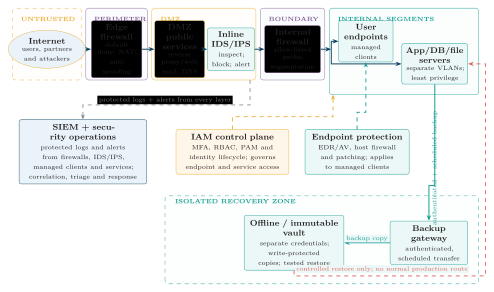
Defense-in-depth architecture from the untrusted Internet through perimeter, DMZ and internal trust boundaries to segmented endpoints and servers, with IAM, endpoint protection, centralized monitoring and an isolated immutable recovery path.
| Attack | Security objective at risk | Layered response |
|---|---|---|
| Web injection | Database confidentiality and integrity | Parameterized queries, input validation, least-privilege database role, WAF and code review |
| Vulnerability exploitation | Potentially all CIA objectives | Asset inventory, risk-based patching, secure configuration, scanning and segmentation |
| Insider misuse | Confidentiality and integrity | Least privilege, separation of duties, DLP, protected/immutable logs and independent review |
| Supply-chain compromise | Software integrity and authenticity | Signed releases, dependency/SBOM review, provenance verification, controlled builds and sandboxing |
| DNS/cache spoofing | Traffic redirection and credential theft | Validated, randomized resolution; DNSSEC where supported; and TLS certificate checks at the application endpoint |
Layered responses to additional attack classes.
Incident-Response Procedure
Section titled “Incident-Response Procedure”Incident response limits harm and restores trustworthy operation. The exam-ready sequence is
prepare detect, identify and triage contain eradicate recover from known-good sources monitor, learn and improve
Preparation establishes roles, contacts, logging, tools, playbooks and tested recovery capability before an incident. Documentation, evidence preservation, communication and legal/privacy decisions begin during identification and continue across the lifecycle; urgent containment and volatile-evidence capture may proceed in parallel according to the response plan. Containment should not unnecessarily destroy evidence. Recovery is not merely powering systems back on: credentials may need rotation, systems must be rebuilt or cleaned from trusted sources, backups verified before use, and heightened monitoring maintained for recurrence. Legal, regulatory, contractual and organizational rules determine whom to notify and when.
Malware Classification
Section titled “Malware Classification”Malware labels can overlap: for example, ransomware may arrive disguised as a Trojan and a worm may deliver a ransomware payload. Classification should therefore state the defining behaviour rather than assume each sample belongs to exactly one box.
| Type | Description | Key feature |
|---|---|---|
| Virus | Attaches to a host file, program, macro or boot area and spreads when the infected host runs | Host-dependent replication |
| Worm | Stand-alone code that self-replicates across systems or networks | Automatic propagation |
| Trojan horse | Disguises itself as legitimate or desirable software to induce installation/execution | Deceptive delivery |
| Ransomware | Encrypts data or locks systems and demands payment or another concession | Extortion and denied availability |
| Spyware | Secretly monitors activity or gathers data without informed consent | Surveillance and data theft |
| Adware | Displays unwanted advertising and may track behaviour | Advertising and tracking |
| Rootkit | Hides malicious presence or maintains privileged access by altering or subverting system visibility | Stealth at elevated privilege |
| Keylogger | Records keystrokes or equivalent input to capture secrets | Credential and data capture |
Common malware classes and their defining features.
Virus Types
Section titled “Virus Types”| Type | Description |
|---|---|
| File virus | Infects executable or other program files and activates when the host program runs |
| Boot-sector virus | Infects a storage device’s boot record or boot area and may run during startup |
| Macro virus | Uses a document application’s macro language and spreads through macro-enabled documents/templates |
| Multipartite virus | Infects more than one target class, commonly both files and a boot area |
| Polymorphic virus | Changes or re-encodes its observable form across copies to reduce simple signature detection while retaining behaviour |
| Resident virus | Loads into memory and can infect files while the system continues operating |
Frequently examined virus types.
Symptoms of Virus or Malware Infection
Section titled “Symptoms of Virus or Malware Infection”Possible indicators include:
-
unusually slow performance, unexplained resource use or frequent crashes;
-
files that are missing, corrupted, unexpectedly renamed or changed;
-
unwanted pop-ups, unknown programs, processes or configuration changes;
-
anti-malware, logging or update services disabled unexpectedly; and
-
unexplained storage, processor or network activity.
These symptoms are indicators, not proof: failing hardware, software bugs or legitimate maintenance can look similar. Confirm with trusted tools, logs and an incident process rather than deleting evidence impulsively.
Prevention and Recovery Readiness
Section titled “Prevention and Recovery Readiness”-
Use centrally managed, updated antivirus/anti-malware or EDR where appropriate, and investigate detections.
-
Keep operating systems, applications, browsers and firmware patched according to risk.
-
Avoid unexpected attachments and links, and do not install pirated or untrusted software.
-
Disable unnecessary macros; permit signed or trusted macros only where the business process requires them.
-
Use least-privilege user and service accounts, with administrative access separated from everyday activity.
-
Maintain regular protected backups, including offline or immutable copies, and test restoration.
-
Control and scan removable media before use, while recognizing that scanning cannot guarantee safety against an unknown threat.
Backups do not prevent infection; they reduce recovery loss after infection. Likewise, anti-malware complements patching, allow-listing, segmentation and safe user behaviour rather than replacing them.
Spam Control and Email Authentication
Section titled “Spam Control and Email Authentication”| Method | Function | Important qualification |
|---|---|---|
| Spam filter | Scores message, sender, links, content and behaviour, then moves, quarantines or rejects likely spam | False positives/negatives require tuning, review and an abuse-reporting process |
| Blacklist / blocklist | Blocks known abusive sender addresses, domains or IP reputation | Entries age and attackers move; reputation alone is insufficient |
| Whitelist / allow-list | Allows named trusted senders or paths | A compromised trusted account can abuse the exception, so keep scope narrow |
| SPF | A DNS policy lets a receiving server check whether the connecting IP is authorized to send for the SMTP envelope domain | SPF does not authenticate message content or necessarily the visible From: domain, and ordinary forwarding can affect results |
| DKIM | A sending domain signs selected headers and the body; the receiver uses the domain’s DNS public key to test integrity and domain responsibility | A valid DKIM signature does not prove the message is honest or that a named person authored it |
| DMARC | Requires SPF and/or DKIM to pass with alignment to the visible From: domain, then publishes monitoring/enforcement policy and reports | Effective reject/quarantine policy should follow correct deployment and monitoring; DMARC still does not judge message intent |
Spam-control and domain-authentication methods.
Hacker Types and the Authorization Caveat
Section titled “Hacker Types and the Authorization Caveat”| Type | Description |
|---|---|
| White-hat | Security professional who tests under explicit authorization and helps improve security |
| Black-hat | Unauthorized malicious attacker seeking theft, damage, disruption or illicit control |
| Gray-hat | Acts without full authorization even if direct harm is not intended or a weakness is later reported |
| Script kiddie | Uses existing tools or scripts with limited understanding; limited skill does not mean limited harm or legal responsibility |
| Hacktivist | Conducts attacks to promote a political or social cause; motive does not itself make access lawful |
Common hacker categories.
Basic Cryptography
Section titled “Basic Cryptography”Cryptography uses mathematical algorithms and keys to protect information and communication. Encryption transforms readable plaintext into ciphertext for confidentiality; other cryptographic mechanisms provide integrity, authentication or signatures rather than secrecy.
| Term | Meaning |
|---|---|
| Plaintext | Original readable data supplied to encryption |
| Ciphertext | Encrypted representation intended to be unintelligible without the authorized key |
| Encryption | Transformation from plaintext to ciphertext |
| Decryption | Authorized inverse transformation from ciphertext to plaintext |
| Key | Secret or public parameter controlling a cryptographic operation; the algorithm may be public, while security depends on correct key use/custody |
Basic cryptographic terms.
For a symmetric cipher with key , the basic correctness relationship is
Modern systems normally prefer authenticated encryption, which also detects unauthorized ciphertext modification; confidentiality-only encryption does not automatically guarantee integrity.
Symmetric and Asymmetric Cryptography
Section titled “Symmetric and Asymmetric Cryptography”| Feature | Symmetric key | Asymmetric / public key |
|---|---|---|
| Keys | Same secret key, or efficiently related secret keys, for encryption and decryption | Mathematically related public/private key pair; private key is secret and public key must be authenticated |
| Speed | Fast and efficient for large data volumes | Slower and used for small values, key establishment and signatures rather than ordinary bulk data |
| Key distribution | Parties need a secure way to establish the shared secret | Public key may be distributed openly, but certificates or another trusted method must bind it to the intended owner |
| Typical use | Bulk data encryption and authenticated encryption | Digital signature, key establishment and recipient-key encryption where supported |
| Examples | AES; DES is a historical example with an inadequate modern key size | RSA and elliptic-curve schemes (ECC families) |
Symmetric-key and asymmetric/public-key cryptography compared.
Most secure protocols are hybrid: public-key methods authenticate peers and establish a fresh session secret, then fast symmetric authenticated encryption protects the data. A public key is not confidential, but it must be authentic; a private key must remain secret.
Hashing
Section titled “Hashing”A cryptographic hash function maps input of arbitrary practical length to a fixed-length digest, . It has no decryption key and is intended to be one-way; hashing is not encryption.
| Property | Meaning |
|---|---|
| Deterministic | The same input under the same algorithm always gives the same digest |
| Fixed-length output | Input length can vary while digest length is fixed by the algorithm |
| Preimage resistance / one-way | Given a digest, finding an input that produces it should be computationally infeasible |
| Second-preimage and collision resistance | It should be infeasible to find a different input matching a chosen message’s digest or any two distinct inputs with the same digest |
| Avalanche effect | A small input change should unpredictably change many output bits |
Required hash properties and meanings.
Hashes support file-integrity checks against a trusted reference, digital signatures, content identification and hash-based constructions such as MACs. A bare hash received beside a file cannot resist an active attacker who can replace both; authenticate the reference with a signature, MAC or trusted channel. Collision-resistant algorithms such as SHA-256/SHA-3 are preferred for modern integrity use; MD5 and SHA-1 are unsuitable where collision resistance matters.
Security Controls and Good Practices
Section titled “Security Controls and Good Practices”Technical Controls
Section titled “Technical Controls”| Control | Purpose and qualification |
|---|---|
| Antivirus / EDR | Detects, blocks and investigates known or suspicious endpoint behaviour; needs updates, telemetry, tuning and response |
| Firewall | Filters traffic by address, port, state, protocol or application policy; rules require least privilege, logging and review |
| IDS / IPS | Detects suspicious network activity and, for IPS, may block it; coverage and false positives/negatives must be managed |
| Encryption | Protects confidentiality of data at rest or in transit; authenticated encryption also protects ciphertext integrity, while key management remains essential |
| Backup | Enables recovery after deletion, failure or ransomware; copies must be protected, isolated where appropriate and restoration tested |
| Patch management | Inventories, prioritizes, tests and deploys fixes for known vulnerabilities while tracking exceptions |
| Multi-factor authentication | Requires independent factor types so password loss alone is insufficient; phishing-resistant methods are preferred for high-risk access |
| Access control | Limits resources and actions to required identities, roles, devices or services; enforce least privilege and promptly remove stale access |
Core technical controls, purposes and qualifications.
Controls are effective only when configured, monitored and connected to a response process. Defense in depth also needs asset inventory, secure configuration, segmentation, protected logging, physical safeguards, policy and trained people.
User-Level Practices
Section titled “User-Level Practices”-
Use strong, unique passwords—prefer long passphrases over short, artificially complex strings—and store them in a reputable password manager.
-
Enable multi-factor authentication, especially for email, administrator, financial and remote-access accounts.
-
Treat unexpected links, attachments, QR codes and urgent requests as untrusted until independently verified.
-
Apply operating-system, browser, application and device updates promptly according to risk and organizational policy.
-
Download software only from trusted sources and verify publisher signatures or approved distribution channels where available.
-
Lock devices, encrypt portable systems and do not leave authenticated sessions unattended.
-
Back up important data regularly and ensure at least one protected copy can actually be restored.
-
Before entering sensitive data, verify HTTPS, the exact domain and any certificate warning; remember that a padlock protects the connection but does not prove the site’s content or operator is honest.
Quick Review
Section titled “Quick Review”-
CIA triad: confidentiality limits disclosure, integrity protects accuracy/authorized change, and availability delivers service when required.
-
Malware distinction: a virus attaches to a host, a worm self-replicates across systems, and a Trojan is disguised as legitimate software.
-
Spam versus phishing: spam is unsolicited bulk communication; phishing impersonates a trusted party to induce an unsafe disclosure or action.
-
Authorization: cracking is unauthorized malicious security defeat; ethical testing requires written permission, exact scope and controlled reporting.
-
Signature creation: and ; keep secret and send , and normally A’s certificate.
-
Signature verification: authenticate through PKI, recompute and run verification with ; this is not generic public-key decryption.
-
Signature limitation: a valid signature supports integrity, origin authentication and non-repudiation evidence, but not confidentiality.
-
Cryptography: symmetric encryption uses a shared secret and is fast; asymmetric schemes use a public/private pair for signatures, key establishment and selected encryption uses.
-
Hashing: a secure hash is deterministic, fixed-length, one-way, collision-resistant and avalanche-like; passwords require a salted adaptive password KDF, not a bare fast hash.
-
Email authentication: SPF authorizes the sending path, DKIM signs selected message data, and DMARC requires visible-domain alignment and supplies policy/reporting.
-
Defense in depth: place independent preventive, detective and recovery controls at successive trust boundaries so one failure does not expose the final asset.